

You can describe a feature in a paragraph. “The system should let you add a contact, and block the save if a required field is missing.” That sentence is clear enough on paper. It still leaves a lot open: how does the block actually feel, what happens to the screen when it fires, does the flow feel right once you are the one clicking through it. A plan can tell you what a feature does. It cannot tell you how it feels to use.
That gap is the reason TalkIDE puts a clickable mockup in front of every project before any real building starts.
Questions First, Then Something You Can Click
The mockup does not start from nothing. It starts from what you tell Vera.
Vera runs the requirements conversation and asks the questions a good product person asks: not “write me a prompt,” but what the thing should do, what it needs to remember, how the pieces relate. She runs that conversation end to end.
Your answers become the mockup. Remy, the Mockup Designer, builds the actual clickable screens from what Vera learned in that conversation. Otto, who deploys it, puts the mockup live before Vera reports back to you with it.
That order is the whole point. A prompt asks you to describe the app before you have seen it. Here, you react to something real: click a button, watch a save go through, tell Vera what’s wrong. You correct a mockup. You do not rewrite a prompt and hope the next attempt lands closer.
Why the mock is cheap and the build is not explains the split in full. Getting the flow right at this stage, before anything is built, is exactly why it stays cheap.
What “clickable” actually means here
A mockup on TalkIDE is not a static picture of a screen. It is built with real UI components and runs against fake data, but the screens themselves are live. You can open a contact from a list. Hit “add.” Watch the save action transition you into the new record’s view. Try to send something with a required field missing, and watch it get blocked, the same way it would in the finished app.
Same layout, same state transitions, same validation logic the real app would eventually have. What is missing is a real backend and a real database behind it. Everything you click is genuinely there to be clicked, it is just running on data that was never meant to last.
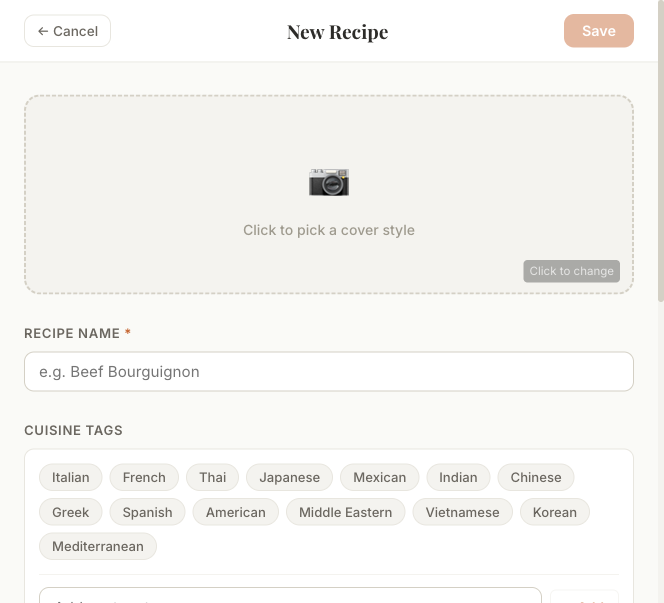
That distinction matters more than it sounds like it should. A written description of “the system validates X” asks you to imagine the moment the validation fires. A mockup puts you in that moment. You do not have to imagine whether a flow feels right. You get to feel it.
Why the timing matters
None of this would matter much if it were free to check later. It is not, once real building starts.
Before a single line of production code exists, changing a flow in the mockup is a component edit. Move a step, swap a field, change what happens after save, and it is a small, contained change to a screen that was never wired to anything permanent.
Once the IT team starts implementing, that same kind of change stops being free. It can mean a schema change, real code changes across more than one place, and a fresh round of testing to make sure nothing else broke. The mockup exists in a deliberately separate, consequence-free track specifically so that flow and behavior questions get worked out while they still cost almost nothing to answer.
A deliberate design principle, not a nice-to-have
This is not an incidental step that happened to end up in the process. It reflects a specific bet about how building software should go: converge cheaply, together with the person building the project, on what the product should look like and how it should behave, using a mockup, before committing to a full implementation cycle that would otherwise be the first place any of that gets tested for real.
Discovering a flow problem while looking at a mockup costs you a conversation and a few edits. Discovering the same problem after the code and the data models already exist costs a rebuild. Putting the mockup first is a bet that the first kind of discovery is worth insisting on, every time, rather than hoping it will not be needed.
What the mockup deliberately is not
The mockup is not trying to be the finished product, and it helps to be honest about that up front.
It runs on mock data only. There is no real backend behind it and no real accounts. It is a decision-making tool for flow and behavior, not a promise of exact final pixels. Some details will change between the mockup and the app you actually ship.
That is not wasted work, though. When a project hands off to the IT team, the reusable parts of the mockup’s interface carry forward. The fake-data layer gets swapped for real APIs behind it, rather than the team starting the interface over from a blank page. The mockup buys you a cheap round of getting the flow right, and then a good chunk of what you approved keeps going into the real thing.
The short version
A text plan and a clickable mockup answer different questions. The plan tells you what a feature is supposed to do. The mockup lets you click “add,” watch a save go through, try to break a validation rule, and know whether the flow actually holds up, all before that knowledge costs anything to act on.
On TalkIDE, that mockup is built by Remy, working alongside the rest of the Business team, as part of shaping your idea before a build ever starts. If you want to see how that conversation works end to end, read Plan Your Idea With Vera Before You Build.
Ready to see what a mockup of your own idea looks like? Start a project at talkide.app, or see the mockup step in action in our step-by-step tutorial.